
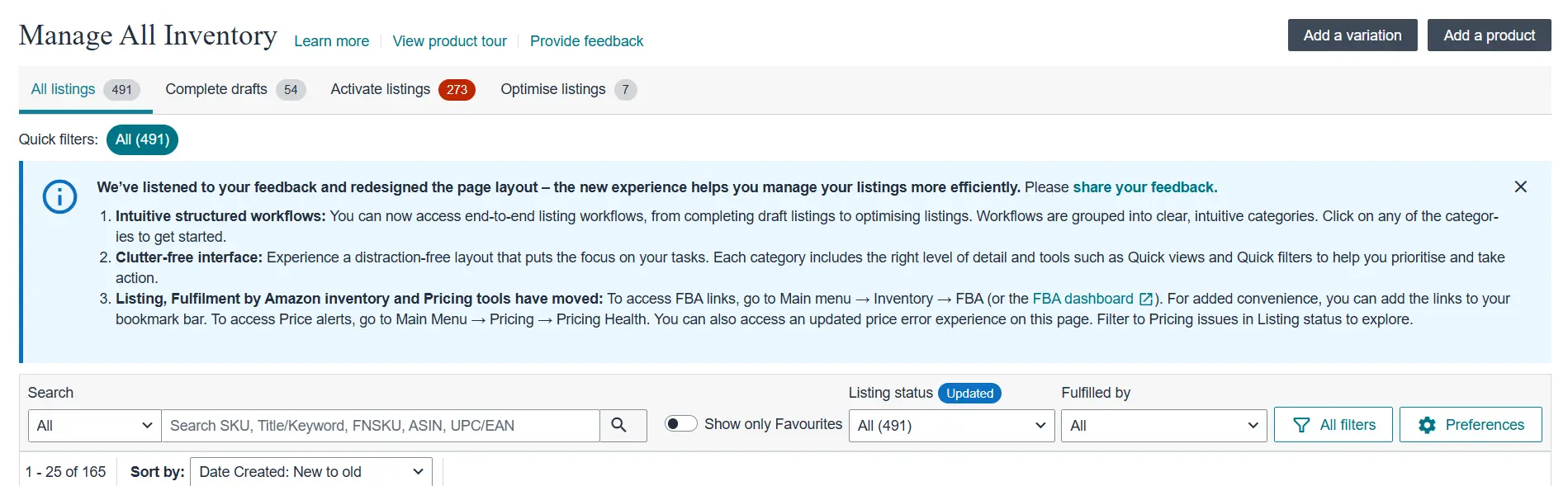
Amazon has rolled out a major update to the Seller Central “Manage All Inventory” interface, designed to simplify and streamline the listing management experience for sellers. Whether you’re a seasoned Amazon seller or just getting started, understanding these changes can help you navigate Seller Central more efficiently—and make better use of your time.
In this post, we’ll break down what’s new, what’s moved, and how you can adapt quickly.
What’s New in the Amazon Seller Central Interface?
1. 🧭 Intuitive Workflows for Listings
Amazon has introduced structured workflows that group actions into clear categories—such as:
- Complete Drafts
- Activate Listings
- Optimize Listings
This means sellers can now work through their inventory more logically, moving from one task to the next without jumping between menus.
2. 🧹 Clutter-Free, Task-Oriented Design
The new interface is much cleaner, with a layout focused on reducing distractions. Amazon has added:
- Quick Filters to sort listings by status
- Quick Views for faster insights
- Streamlined Categories to prioritize tasks
This makes it easier to focus on what matters most—managing and optimizing your listings.
3. 🔄 Navigation Changes You Should Know
Several key tools have moved to new locations:
- FBA Inventory Tools are now found at:
Main Menu → Inventory → FBA - Pricing Health and Price Alerts are now under:
Main Menu → Pricing → Pricing Health - You can now filter for Pricing Issues directly within listing statuses.
Pro tip: Bookmark these new pages for faster access in the future.
Why This Update Matters
These updates are based on direct feedback from sellers and are aimed at making the platform more efficient, especially for businesses managing a large number of listings.
Whether you’re:
- Adding new variations,
- Completing listing drafts,
- Optimizing underperforming ASINs, or
- Monitoring FBA and pricing health…
…the new interface makes it easier to get things done with fewer clicks and less confusion.
How We Can Help
As an Amazon service provider, we help sellers make the most of Seller Central—especially when major updates like this happen.
If you’re unsure how to navigate the new layout or want help optimizing your listings using the new tools, get in touch. We offer:
- Listing Optimization
- FBA Inventory Management
- Pricing Strategy Support
- And much more
Need help adapting to the update? Let’s connect and streamline your Amazon operations together.
Want a walkthrough of the new interface or help with listing optimization? Contact us today!